How to Choose a GPS Tracker for an Elderly Family Member
What to Look For When Choosing a Senior GPS Alarm
Finding the right GPS tracker for an older relative can feel overwhelming. There are many devices on the market, and each one promises something different. The goal is to pick something that gives you peace of mind without making your family member feel monitored or burdened. This guide walks through the key features to consider, in order of importance, so you can make a confident choice.
Step 1: Prioritise Reliable Location Accuracy
The whole point of a tracker is knowing where the person is. Look for a device that uses both GPS and Wi-Fi location. GPS works well outdoors, but can struggle inside buildings or in dense urban areas. Wi-Fi location helps fill those gaps, giving a more accurate picture when the person is at home or in a shopping centre. A tracker that combines both systems will give fewer false alarms and more reliable updates.
Check how often the device updates its position. Some trackers report every few minutes, others only when the person moves a certain distance. For an elderly person who may wander or become confused, more frequent updates are better. But be aware that constant updates can drain the battery faster, so there is a trade-off.
Step 2: Evaluate SOS and Fall Detection Features
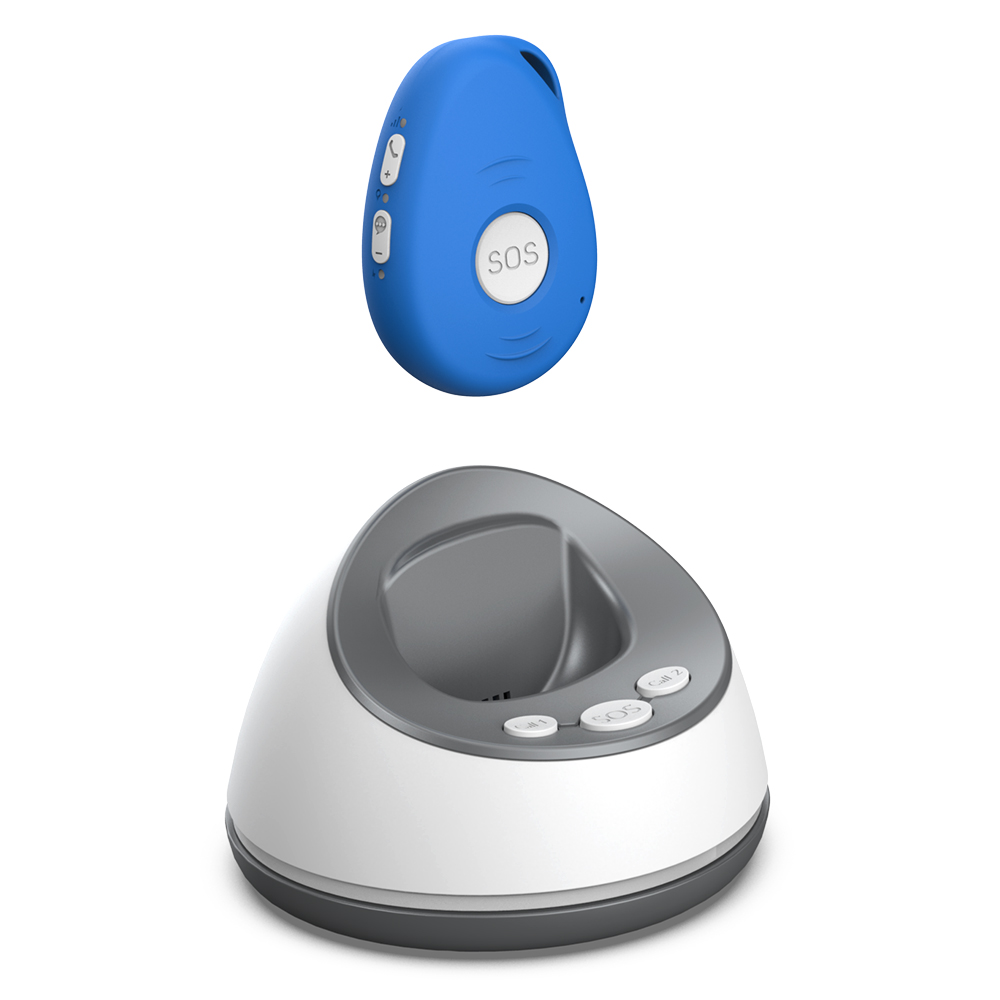
An SOS alert button is essential. The person should be able to press it easily, even in a panic. Look for a device with a prominent, tactile button that is hard to press by accident but easy to find when needed. Some trackers also have automatic fall detection, which can be a lifesaver if the person falls and cannot press the button.
Fall detection uses sensors to detect a sudden impact and a change in orientation. Not all trackers have this, and the accuracy varies. More advanced models use multiple sensors to reduce false alarms, such as when someone drops the device or bends over suddenly. If your family member is unsteady on their feet or has a history of falls, this feature should be high on your list.
Step 3: Check Battery Life and Charging Convenience
A tracker that needs charging every day is not practical. Look for a device with a battery that lasts at least a few days, ideally a week or more. The battery life depends on how often the device reports location and whether features like fall detection are always on. Some trackers have a power-saving mode that extends battery life by updating less often when the person is stationary.
Also consider how the device is charged. Some have a built-in rechargeable battery, others use replaceable coin cells. Rechargeable models are more convenient in the long run, but you need to remember to charge them. If the person is likely to forget, a model with a long-lasting battery and a clear low-battery alert is better.
Step 4: Think About Wearing Options and Comfort
The tracker is only useful if it is worn consistently. Think about what the person will actually be comfortable wearing day and night. Common options include a pendant on a lanyard, a clip-on device that attaches to a belt or pocket, or a wristband. Each has pros and cons.
A pendant is easy to reach in an emergency and can be worn under clothing, but some people find lanyards uncomfortable or a choking hazard. A clip-on is less obtrusive but may be forgotten or lost. A wristband is always visible and less likely to be taken off, but not everyone likes wearing a watch. If possible, let the person try a few styles before deciding. Some trackers come with multiple wearing options in the box, which gives flexibility.
Step 5: Understand Mobile Coverage and Network Dependence
Most GPS trackers rely on a mobile network to send location data to your phone. Check which networks the device works on, and whether it will have good coverage in the areas where the person spends time. In New Zealand, coverage can vary between regions, especially in rural or remote areas. Some trackers use multiple network bands to improve reliability.
Also consider what happens if the mobile network is down or the person is in a spot with no signal. Some devices store location data and send it when the signal returns. Others may not work at all. If the person lives in a area with patchy coverage, look for a tracker that can store data temporarily or that uses a fallback method like Wi-Fi for location updates.
Step 6: Look at Monthly Fees and Long-Term Costs
Many GPS trackers come with a monthly subscription fee for the SIM card or cloud service. These fees can add up over time, especially if you are paying for multiple years. Some devices, like the one offered by familyr.co.nz, have no monthly fees at all. That can make a big difference in the total cost over the life of the device.

When comparing options, look at the total cost over two or three years, not just the upfront price. A cheaper device with a high monthly fee can end up costing more than a pricier device with no ongoing charges. Also check whether the device requires a contract or if you can cancel anytime.
Step 7: Test Two-Way Communication
Some trackers allow you to speak to the person through the device, like a two-way radio. This can be very useful if they are confused, lost, or need reassurance. You can talk them through a situation without having to be there in person. Not all trackers have this feature, and the quality varies. Look for a device with a clear speaker and a microphone that picks up the person's voice well, even in a noisy environment.
Two-way communication is especially helpful if the person has difficulty using a phone or if they tend to ignore calls. With a built-in speaker, you can get their attention even if they have left their phone somewhere else.
Step 8: Consider Ease of Setup and Daily Use
If the device is complicated to set up or use, it probably will not get used. Look for a tracker that comes pre-configured or has a simple app that guides you through the process. The person wearing it should not need to do much more than charge it and put it on. Some devices require pairing with a smartphone app, which can be a barrier if the person does not use a smartphone.
Check whether the device has a simple interface for the wearer. Buttons should be clearly labelled or have a distinct shape. The device should give clear feedback, like a beep or a light, when an alert is sent or when the battery is low. If the person has vision or hearing difficulties, look for a device with both visual and audio cues.
Making the Final Decision
Start by listing what matters most for your situation. If falls are a concern, fall detection is a must. If the person is prone to wandering, frequent location updates are key. If they are independent and just need a safety net, a simple SOS button with long battery life might be enough.

Once you have narrowed down the options, check reviews from other families who have used the device. Look for comments on real-world battery life, accuracy of fall detection, and how easy the device is to wear. If possible, talk to the person who will wear it and get their input. They are more likely to use a device they feel comfortable with.
Finally, consider the support and return policy. If the device does not work as expected, you want to be able to return it easily. Some companies offer a trial period, which can be very helpful for testing the device in real conditions. A tracker that works well on paper might not be right for your family member's daily life, so having an option to change your mind is valuable.
Choosing a GPS tracker for an elderly family member is a personal decision. There is no one-size-fits-all answer. But by focusing on the features that matter most, you can find a device that keeps them safe and gives you peace of mind. For example, the solution offered by familyr.co.nz combines many of these features without ongoing fees, which is worth considering as you compare your options.